 

|
Greenfoot Video Tutorials
How to make things move in Greenfoot
Part IIA closer look at the Wombat Class's Code
Below is the code for the Wombat class. To see this code. Right-click over the Wombat Icon and choose "Open editor".
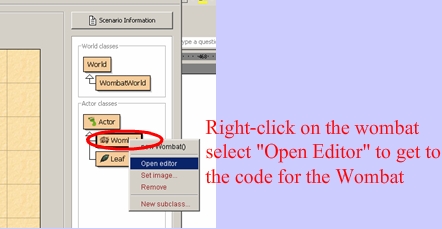
You then see code similar to the picture below.

Find the move() method in your wombat class. Here is some code that I added to the move() method.

In the text area below is all of the code for the "modified" Wombat Class. Copy all of the code from the text area below into your Wombat class. Then put a new wombat on the stage and run the program.
Some Useful Methods that Wombats can use
| Method |
Meaning |
| getRotation() |
|
| setRotation( 5) |
sets Wombat’s rotation to 5 |
| setRotation(getRotation() + 5) |
gets the Wombat’s current rotation + 5 setDirection(WEST); |
| canMove() |
returns a boolean that lets you know whether or not there is anything blocking the path of a Wombat, like the edge of the world etc.. |
| move() |
this a long method that does many things. Mainly though, if(canMove() == true) the wombat moves forward, otherwise it turns left |
| turnLeft() |
pretty self descriptive! |
Part III Assignments for my students
- Task #1) Modify the Wombat class so that it takes 30 steps and stops.
- Task #2) Modify the Wombat class so that every 4 steps that it makes it will turn left. Note: The wombat will still have to turn left if it hits a wall before taking 5 steps. Whenever the Wombat hits a wall, reset the number of steps to zero. Hint: Most of your modifications to this class should go in the act() method.
- Task #3) Modify the WOmbat class so that it only eats every other leaf that it finds.
- Task #4) Look at the TurnLeft() method, the code is reproduced below.. Make a similar method but that is called TurnRight()
    public void turnLeft()
    {
        switch(direction) {
            case SOUTH :
                setDirection(EAST);
                break;
            case EAST :
                setDirection(NORTH);
                break;
            case NORTH :
                setDirection(WEST);
                break;
            case WEST :
                setDirection(SOUTH);
                break;
        }
    }
- Task#5) Create a wombat that makes 2 steps and tries to turn in a random direction
(up,down,left or right).
- Her's how to create random numbers in java
How to Change a double to an int
double myDouble = 1.4;
int myInt = (int) myDouble; // (int) 'casts' the data to an int

How to Create a Random int
double randD = Math.random(); //between 0 and .99999999
//flipACoin  is always either 1 or 2
//because .999 * 2 = 1.99800 which becomes 1 if we're dealing with an int
int flipACoin =  (int)(randD *2); //multiply by 2, truncate
int oneThroughThree= (int) (randD *2  + 1);
Move on to the next lesson and Labs
|

 Graphing Calc
